


Locking and unlocking from the outside
NOTE
If you unlock the driver’s door with a key and open the door while the alarm system is armed, the alarm system is triggered and the vehicle’s horn sounds. In this case, perform any of the following operations:
• Press any button on the remote transmitter.
• Insert the key into the ignition switch and turn the ignition switch to the “ON” position.
For details about the alarm system, refer to “Alarm system”.
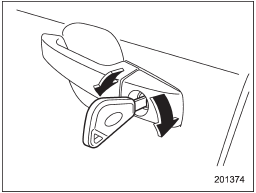
To lock the driver’s door from the outside with the key, turn the key toward the rear.
To unlock the door, turn the key toward the front. Pull the outside door handle to open an unlocked door.
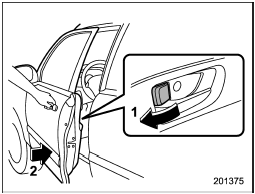
1) Rotate the lock lever rearward.
2) Close the door.
To lock the door from the outside without the key, rotate the lock lever rearward and then close the door.
To lock the door from the outside using the power door locking switch, push the front side of the switch (“LOCK” side) and then close the door. In this case, all closed doors and the rear gate (for 5-door) are locked at the same time.
Always make sure that all doors and the rear gate (for 5-door) are locked before leaving your vehicle.
NOTE
Make sure that you do not leave the key inside the vehicle when locking the doors from the outside without the key.
See also:
Behavior with key lock-in prevention function non-operational
- If the lock lever is turned to the rear
(“LOCK”) position with the driver’s door
open and the driver’s door is then closed
with the lock lever in that position, the
driver’s door is locked.
...
Trunk lid (4-door)
• To prevent dangerous exhaust gas from entering the vehicle, always keep the trunk lid closed while driving.
• Help prevent children, adults or animals from locking themselves in the trunk. On h ...
Interior lights
When leaving your vehicle, make sure the
lights are turned off to avoid battery
discharge. ...