


Changing the remote control batteries

- Do not let dust, oil or water get on or in the remote engine start transmitter when replacing the battery.
- Be careful not to damage the printed circuit board in the remote engine start transmitter when replacing the battery.
- Be careful not to allow children to touch the battery and any removed parts; children could swallow them.
- There is a danger of explosion if an incorrect replacement battery is used. Replace only with the same or equivalent type of battery.
- Batteries should not be exposed to excessive heat such as sunshine, fire or the like.
The two 3-volt lithium batteries (model CR-1220) supplied in your remote control should last approximately 3 years, depending on usage. When the batteries begin to weaken, you will notice a decrease in range (distance from the vehicle that your remote control operates).
Follow the instructions below to change the remote control batteries.
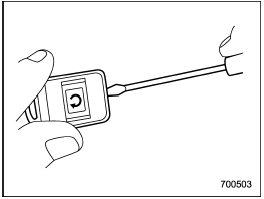
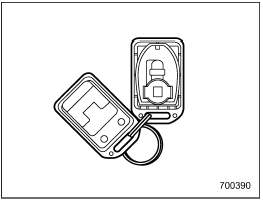
1. Carefully pry the remote control halves apart using a small flat-head screwdriver.
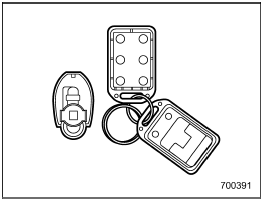
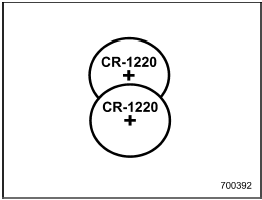
2. Remove the circuit board from the bottom half of the case and slide the white plastic battery holder out from under the battery tab releasing the batteries. Remove the old batteries and replace with new ones. Be sure to observe the (+) sign on the old batteries before removing them to ensure that the new batteries are inserted properly (battery “+” should be pointed away from the transmitter circuit board on both batteries).
3. Carefully snap the case halves back together, then test the remote control.
FCC WARNING
Changes or modifications not expressly
approved by the party responsible
for compliance could void
the user’s authority to operate the
equipment.
NOTE
This device complies with Part 15 of
the FCC Rules and RSS-Gen of IC
Rules. Operation is subject to the
following two conditions: (1) this device
may not cause harmful interference,
and (2) this device must accept
any interference received, including
interference that may cause undesired
operation.
See also:
To open the trunk lid from inside
Pull the trunk lid release lever upward. ...
Power switch and volume control
Type A and B audio
Type C audio
The dial is used for both power (ON/OFF) and volume control. The radio is turned ON and OFF by pushing the dial, and the volume is controlled by turning the dial. ...
Light control and wiper control levers/switches
1) Windshield wiper (page 3-31)
2) Mist (page 3-32)
3) Windshield washer (page 3-33)
4) Rear window wiper and washer switch (page 3-34)
5) Wiper intermittent time control switch (page 3-33)
6) ...