


Starting your vehicle
Starting your vehicle
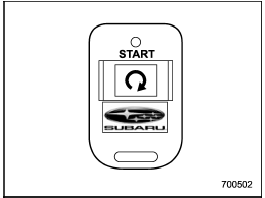
The remote control start system is activated
by pressing the “ ” button twice
within 3 seconds on your remote control
transmitter. The system will check certain
pre-conditions before starting, and if all
safety parameters are correct, the engine
will start within 5 seconds. While the
vehicle is operating via remote engine
start, the vehicle’s power window features
will be disabled. Also, the system has a
timer and will shut down after 15 minutes if
you do not operate the vehicle. Press and
hold the “” button for 2 seconds
again to
turn the vehicle off. If the vehicle’s starter
cranks but does not start or starts and
stalls, the remote engine start system will
power off then attempt to start the vehicle
an additional four times. If the vehicle fails
to start after the additional attempts, the
remote engine start system will abort and
return to a non-activated state.
” button twice
within 3 seconds on your remote control
transmitter. The system will check certain
pre-conditions before starting, and if all
safety parameters are correct, the engine
will start within 5 seconds. While the
vehicle is operating via remote engine
start, the vehicle’s power window features
will be disabled. Also, the system has a
timer and will shut down after 15 minutes if
you do not operate the vehicle. Press and
hold the “” button for 2 seconds
again to
turn the vehicle off. If the vehicle’s starter
cranks but does not start or starts and
stalls, the remote engine start system will
power off then attempt to start the vehicle
an additional four times. If the vehicle fails
to start after the additional attempts, the
remote engine start system will abort and
return to a non-activated state.
See also:
Making a phone call from speed dial
It is possible to select a phone number
from speed dial registered with the invehicle
equipment to make a phone call.
1. Select the top menu (phone menu).
2. Press the preset button (from
to
...
PTY (Program type) group tuning (only FM reception)
Press the “PTY/CAT” button to change to the PTY selection mode. At this time,
the PTY group that you are currently listening to will be displayed for 10 seconds.
In PTY selection mode, “PTY SEL” ...
SUBARU advanced frontal airbag system
Your vehicle is equipped with a SUBARU
advanced frontal airbag system that complies
with the new advanced frontal airbag
requirements in the amended Federal
Motor Vehicle Safety Standard (FMVS ...