


To remove the cover
1. Rewind the cover.
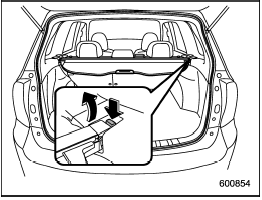
2. Push the switch that is next to the right end of the cover housing.
3. Take it off the retainer.
See also:
Front fog light switch (if equipped)
The front fog lights operate only when the light switch is in the “” position.
However, the front fog lights turn off when the headlights are switched to high beam.
To turn on the front fog lights ...
High beam indicator light
This light shows that the headlights are in
the high beam mode.
This indicator light also illuminates when
the headlight flasher is operated. ...
Selection of manual mode
With the vehicle either moving or stationary,
move the select lever from the “D”
position to the manual gate then move it to
the “+” end or “−” end of the manual gate
to select manua ...