


Menu list of the Hands-free system
Turn the “TUNE/TRACK/CH” dial to select a menu, and then press the dial to enter the selected menu.
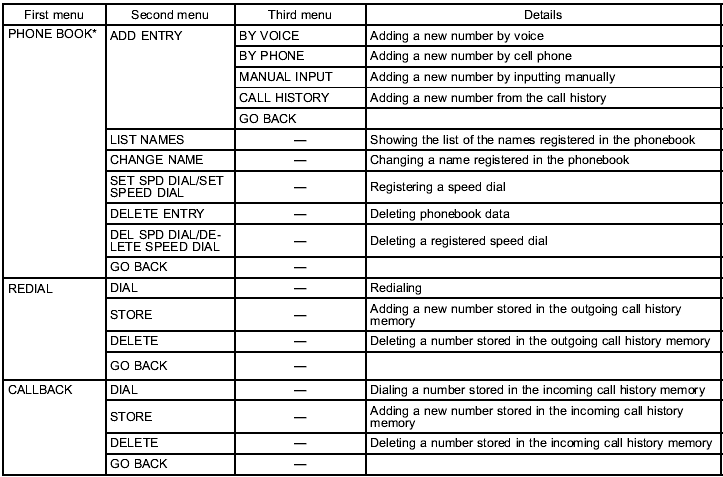
*: If a cell phone is not registered, the menu described in the chart is not indicated.
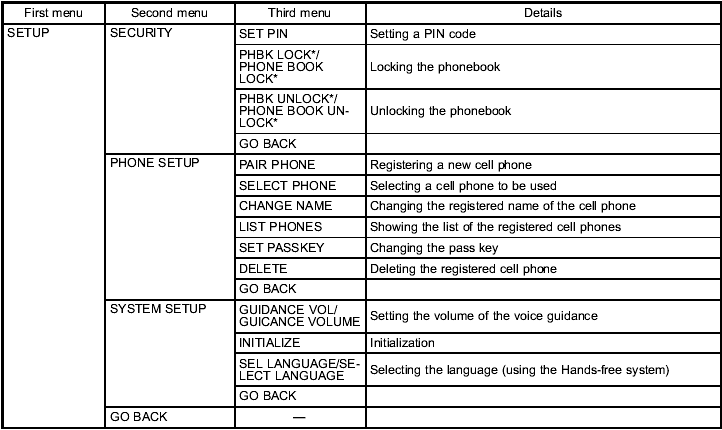
*: If a PIN code is not registered, the menu described in the chart is not available.
See also:
Using the Hands-free system
Turning on/off the Hands-free mode
1) OFF hook switch
2) ON hook switch
To turn on the Hands-free mode, press the OFF hook switch
. To turn off the Hands-free mode,
press the ON hook switch .
...
System servicing
WARNING
● When discarding a seatbelt retractor assembly or scrapping the entire vehicle
damaged by a collision, consult your SUBARU dealer.
● Tampering with or disconnecting the system ...
Recommended spark plugs
Refer to “Electrical system” F12-8. ...