


Repeating
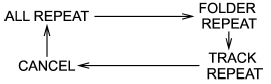
Repeating is operated in the same way a CD is played. Refer to “Repeating”.
Each time you briefly press the  button (type C audio)/
  button (the
“RPT” button) (type D audio), the mode
changes in the following sequence.
button (the
“RPT” button) (type D audio), the mode
changes in the following sequence.
See also:
When the brakes get wet
When driving in rain or after washing the vehicle, the brakes may get wet. As
a result, brake stopping distance will be longer. To dry the brakes, drive the vehicle
at a safe speed while lightly d ...
Abbreviation list
You will find several abbreviations in this
manual. The meanings of the abbreviations
are shown in the following list.
...
Seatbelt maintenance
To clean the seatbelts, use a mild soap and lukewarm water. Never bleach or dye
the belts because this could seriously affect their strength.
Inspect the seatbelts and attachments including the web ...