


Manual tuning
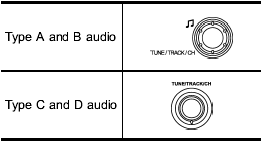
Turn the “TUNE/TRACK/CH” dial clockwise to increase the tuning frequency and turn the “TUNE/TRACK/CH” dial counterclockwise to decrease it.
Each time the dial is turned, the frequency interval can be changed between 10 kHz in the AM mode and 0.2 MHz in the FM mode.
See also:
Towing and tie-down hooks
The towing hooks should be used only in an emergency (e.g., to free a stuck vehicle from mud, sand or snow).
• Use only the specified towing hook and tie-down hook. Never use suspension parts or ...
Acc
In this position the electrical accessories
(radio, accessory power outlet, etc.) can
be used. ...
Audio control buttons (if equipped)
These buttons are located on the spokes of the steering wheel. They allow the driver to control audio functions without taking his/her hands off the steering wheel. ...