


Programming rolling-code-protected garage door openers in the U.S.A.
If your garage door opener has a rolling code feature, program the HomeLink® Wireless Control System for it by following steps 1 through 5 in “Garage door opener programming in the U.S.A.”. Then continue with the following steps.
NOTE
The assistance of a second person
may make the programming quicker
and easier.
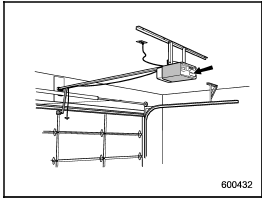
1. Locate the training button on the garage door opener motor head unit.
The exact location and color of the button may vary by brand of garage door opener.
If it is difficult to locate the training button, refer to your garage door opener’s instruc- tion manual.
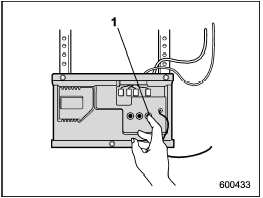
1) Training button
2. Press the training button on the garage door opener motor head unit (which activates the “training light” on the unit). Proceed to step 3 within 30 seconds.
3. Inside the vehicle, firmly press, hold for 2 seconds and release the HomeLink® button that was programmed in the previous section. Press and release the button a second time to complete the programming procedure.
NOTE
Some garage door openers may require
you to do the above press-holdrelease
sequence a third time to complete
the programming.
4. The garage door opener should now recognize the HomeLink® Wireless Control System and your garage door opener should activate when the HomeLink® button is pressed.
See also:
Key replacement
Your key number plate and security ID plate will be required if you ever need a replacement key made. Any new key must be registered for use with your vehicle’s immobilizer system before it can be use ...
To increase the speed (by the “RES/ SET” switch)
Press the “RES/SET” switch to the “RES” side and hold it until the vehicle reaches
the desired speed. Then, release the switch. The vehicle speed at that moment will
be memorized and treated as ...
Shopping bag hook
CAUTION
Do not hang items on the shopping bag hook that weigh 11 lbs (5 kg) or more. ...