


Information display
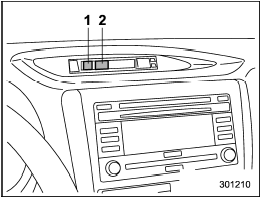
Information display
1) Outside temperature indicator
2) Fuel consumption indicator
With the ignition switch in the “ON” position, the outside temperature and fuel consumption are indicated on the display.
For type A combination meter:
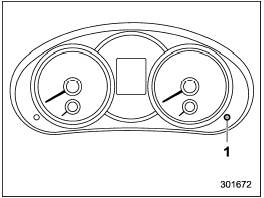
1) Information display switching knob
With the ignition switch in the “ON” position, each successive press of the information display switching knob toggles the display in the following sequence.

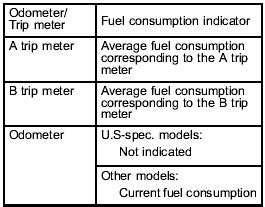
For type B combination meter:
The fuel consumption indicator is linked with the odometer/trip meter display on the combination meter, according to the following chart.
See also:
Selecting audible signal operation
Using an electronic chirp, the system will give you an audible signal when the doors lock and unlock. If desired, you may turn the audible signal off.
Do the following to deactivate the audible signa ...
Defrosting or defogging
Defrosting or defogging
To direct warm air to the windshield and front door windows:
1. Set the airflow control dial to the “” position.
2. Set the temperature control dial to the red side.
3. Set ...
Front passenger’s seat (if equipped)
1) Seat position forward/backward control switch
To adjust the seat forward or backward, move the control switch forward or backward.
2) Seatback angle (reclining) control switch
To adjust the an ...