


Locking the passengers’ windows
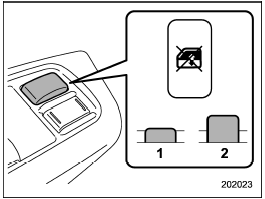
Locking the passengers’ windows
1) Lock
2) Unlock
Push the lock switch. When the lock switch is in the “LOCK” position, the passengers’ windows cannot be opened or closed.
Push the switch again to cancel the passengers’ window locking.
See also:
Forward and backward adjustment
Pull the lever upward and slide the seat to the desired position. Then release
the lever and try to move the seat back and forth to make sure that it is securely
locked into place. ...
Setting PIN code
The PIN code is a 4-digit number and is used when locking the phonebook.
1. Select the “SETUP” menu.
2. Select the “SECURITY” menu.
3. Select the “SET PIN” menu. Then “CURRENT PIN?” is displayed.
...
Feature of distance marker
1) 3 feet (1 m) line
2) 6.5 feet (2 m) line
3) 10 feet (3 m) line
The distance marker shows the distance on the road. If there is a car or other
object close behind, distance cannot be correctl ...