


Power door locking switches
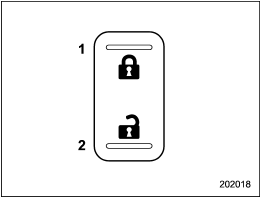
Power door locking switches
1) Lock
2) Unlock
All doors and the rear gate can be locked and unlocked by the power door locking switches located at the driver’s side and the front passenger’s side doors.
To lock the doors, push the front side of the switch.
To unlock the doors, push the rear side of the switch.
When you close the doors after you set the door locks, the doors remain locked.
NOTE
Make sure that you do not leave the key
inside the vehicle before locking the
doors from the outside using the power
door locking switches.
See also:
Media format
Bluetooth audio devices cannot be
connected if they are not compatible with
the following Bluetooth® profiles.
- A2DP (Advanced Audio Distribution
Profile)
- AVRCP (Audio/Video Remote Control ...
Periodic inspections
To keep your vehicle in the best condition at all times, always have the recommended
maintenance services listed in the maintenance schedule in the “Warranty and Maintenance
Booklet” performed at ...
Before checking or servicing in the engine compartment
WARNING
● Always stop the engine and apply the parking brake to prevent the vehicle from
moving.
● Always let the engine cool down. Engine parts become very hot when the engine
is ru ...