


Rear center seating position

The head restraint is not intended to be used at the lowest position.
Before sitting on the seat, raise the head restraint to an appropriate position depending on your sitting height.
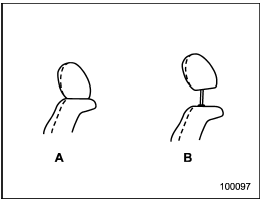
A) When not used (retracted position)
B) When used (click position)
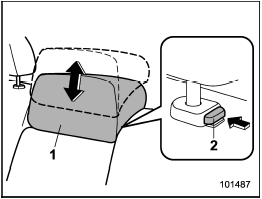
1) Head restraint
2) Release button
To raise:
Pull the head restraint up.
To lower:
Push the head restraint down while
pressing the release button on the top of
the seatback.
To remove:
While pressing the release button, pull out
the head restraint.
To install:
Install the head restraint into the holes that
are located on the top of the seatback until
the head restraint locks.
When the rear-center seating position is occupied, raise the head restraint to an appropriate position depending on your sitting height. When the rear center seating position is not occupied, lower the head restraint to improve rearward visibility.
See also:
Wheel alignment
*: The differential between right-hand camber and left-hand camber should be
within 45’ or less. ...
Brake system warning light
WARNING
● Driving with the brake system warning light on is dangerous. This indicates
your brake system may not be working properly. If the light remains illuminated,
have the brakes insp ...
Ejecting all discs from the player (all disc ejection mode)
1. If you press the “” button for
1.5 seconds or longer, the player will produce beep sound and will enter the all
disc ejection mode. At this time, the disc number indicator and “ALL EJECT” ind ...