


Door step light
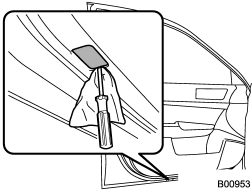
1. Remove the lens by prying the edge of the lens with a flat-head screwdriver.
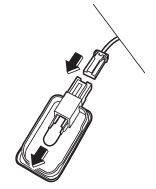
2. Pull the bulb out of the socket.
3. Install a new bulb.
4. Reinstall the lens.
See also:
Uniform tire quality grading standards
This information indicates the relative performance of passenger car tires in
the area of treadwear, traction, and temperature resistance. This is to aid the
consumer in making an informed choice ...
High beam indicator light
This light shows that the headlights are in the high beam mode.
This indicator light also illuminates when the headlight flasher is operated. ...
Ejecting all discs from the player (all disc ejection mode)
1. If you press the “” button for
1.5 seconds or longer, the player will produce beep sound and will enter the all
disc ejection mode. At this time, the disc number indicator and “ALL EJECT” ind ...