


Dome light
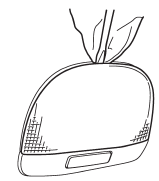
1. Remove the lens by prying the edge of the lens with a flat-head screwdriver.
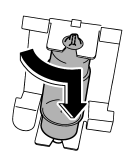
2. Turn the bulb until the flat surfaces at its ends are aligned vertically.
3. Pull the bulb straight downward to remove it.
4. Install a new bulb.
5. Reinstall the lens.
See also:
System servicing
WARNING
● When discarding a seatbelt retractor assembly or scrapping the entire vehicle
damaged by a collision, consult your SUBARU dealer.
● Tampering with or disconnecting the system ...
Unlocking the doors
Unlocking the doors
Press the “” button to unlock
the driver’s door. An electronic chirp will sound twice and the turn signal lights will flash twice.
To unlock all doors and the rear gate (5- doo ...
Before starting out on a trip
● Check that the vehicle and vehicle-tohitch mounting are in good condition.
If any problems are apparent, do not tow the trailer.
● Check that the vehicle sits horizontally with the tr ...