


Rear combination lights
Legacy
NOTE
It may be difficult to replace the bulbs. We recommend that you have the bulbs replaced by your SUBARU dealer if necessary.
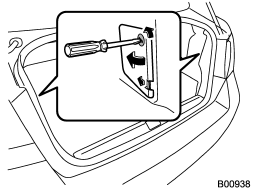
1. Turn the knobs of the cover 90 degrees counterclockwise to remove the cover.
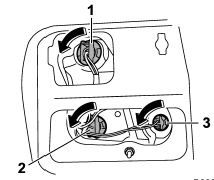
1) Brake/tail and rear side marker light 2) Rear turn signal light 3) Back-up light
2. Remove the bulb holder from the rear combination light assembly by turning it counterclockwise. Use pliers if necessary.
3. Pull the bulb out of the bulb holder and replace it with a new one.
4. Set the bulb holder into the rear combination light assembly and turn it clockwise until it locks.
5. Securely lock the cover against the trunk trim.
Outback
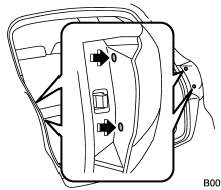
1. Undo the clips. For the method to undo the clips, refer to “Type C clips” F11-6.
2. Remove the cover.
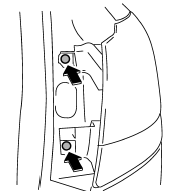
3. Remove the upper and lower screws.
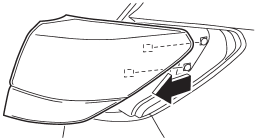
4. Slide the rear combination light assembly straight rearward and remove it from the vehicle.
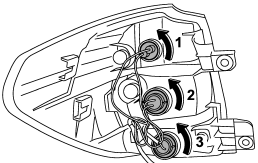
1) Tail and rear side marker light
2) Brake light
3) Rear turn signal light
5. Remove the bulb holder from the rear combination light assembly by turning it counterclockwise.
6. Pull the bulb out of the bulb holder and replace it with a new one.
7. Set the bulb holder into the rear combination light assembly and turn it clockwise until it locks.
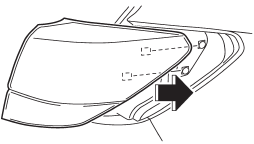
8. Reinstall the rear combination light assembly by sliding the two-pronged part of the combination light assembly securely to each holder of the vehicle side.
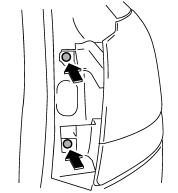
9. Tighten the upper and lower screws.
10. Reinstall the side cover.
See also:
Temperature control dial
This dial regulates the temperature of airflow from the air outlets over a range
from the blue side (cool) to red side (warm). ...
Synthetic oil
You should use synthetic engine oil that meets the same requirements given for
conventional engine oil. When using synthetic oil, you must use oil of the same
classification, viscosity and grade s ...
Adverse safety consequences of under-inflation
Driving at high speeds with excessively
low tire pressures can cause
the tires to flex severely and to
rapidly become hot. A sharp in-
crease in temperature could cause
tread separation, and ...