


Checking the oil level
Check the engine oil level at each fuel stop.
1. Park the vehicle on a level surface and stop the engine. If you check the oil level just after stopping the engine, wait a few minutes for the oil to drain back into the oil pan before checking the level.
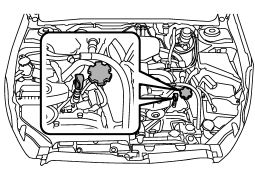
2. Pull out the level gauge, wipe it clean, and insert it again.
3. Be sure the level gauge is correctly inserted until it stops with the graphic
symbol “ ” on its top appearing as shown
in the illustration.
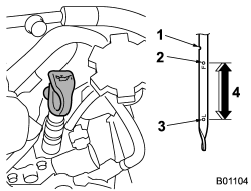
2.5 L models
1) Notch
2) Full level
3) Low level
4) Approximately 1.1 US qt (1.0 liter, 0.9 Imp qt) from low level to full level
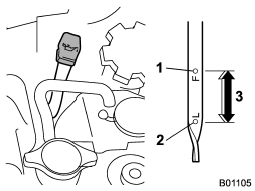
3.6 L models
1) Full level
2) Low level
3) Approximately 1.1 US qt (1.0 liter, 0.9 Imp qt) from low level to full level
4. Pull out the level gauge again and check the oil level on it. If it is below the low level (L), add oil to bring the level up to the full level (F).
CAUTION
● Use only engine oil with the recommended grade and viscosity.
● Be careful not to spill engine oil when adding it. If oil touches the exhaust pipe, it may cause a bad smell, smoke, and/or a fire. If engine oil gets on the exhaust pipe, be sure to wipe it off.
NOTE
● To prevent overfilling the engine oil, do not add any additional oil above the upper level when the engine is cold.
● In 2.5 L engine models, the level gauge has a notch above the upper level. Just after driving or while the engine is warm, the engine oil level reading may be in a range between the upper level and the notch mark. This is caused by thermal expansion of the engine oil.
See also:
Electrical system
AT: Automatic transmission
MT: Manual transmission ...
To arm the system using remote transmitter
1. Close all windows and the moonroof (if equipped).
2. Remove the key from the ignition switch.
3. Open the doors and get out of the vehicle.
4. Make sure that the engine hood (and the trunk lid ( ...
SRS airbag system servicing
WARNING
● When discarding an airbag module or scrapping the entire vehicle damaged by
a collision, consult your SUBARU dealer.
● The SRS airbag has no userserviceable parts. Do not use ...