


Seek tuning (SEEK)
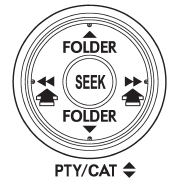
If you press the “ ” or “
 ”
”
side of the “SEEK” button briefly, the radio will automatically search for a receivable
station and stop at the first one it finds. This function may not be available,
however, when radio signals are weak. In such a situation, perform manual tuning
to select the desired station.
See also:
Trailer brakes
WARNING
● Adequate size trailer brakes are required when the trailer and its cargo exceed
1,000 lbs (453 kg) total weight.
● Do not directly connect your trailer’s hydraulic brake syst ...
Reprogramming a single HomeLink® button
1. Press and hold the HomeLink® button
you wish to reprogram. DO NOT release
the button until step 4 has been completed.
2. When the HomeLink® indicator light
begins to flash slowly (after appr ...
Braking when a tire is punctured
Do not depress the brake pedal suddenly when a tire is punctured. This could
cause a loss of control of the vehicle. Keep driving straight ahead while gradually
reducing speed. Then slowly pull of ...