


Power switch and volume control
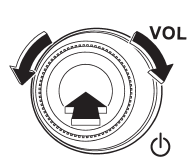
The dial is used for both power (ON/OFF) and volume control. The radio is turned ON and OFF by pressing the dial, and the volume is controlled by turning the dial.
See also:
Stopping the engine
WARNING
Do not stop the engine when the vehicle is moving. This will cause loss of power
to the power steering and the brake booster, making steering and braking more difficult.
It could also res ...
Recommended cold tire inflation pressure
For recommended cold tire inflation pressure for your vehicle’s tires, refer to “Tires”. ...
Tire pressures
Check and, if necessary, adjust the
pressure of each tire (including the spare)
at least once a month and before any long
journey.
Check the tire pressure when the tires are
cold. Use a press ...