


Printed antenna
CAUTION
Do not use sharp instruments or window cleaner containing abrasives to clean the inner surface of the window on which the antenna is printed. Doing so may damage the antenna printed on the window.
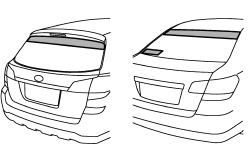
The antenna is printed on the inner surface of the rear window glass.
NOTE
Antenna performance will deteriorate significantly if you apply tinting film or any other material over the antenna portion of the rear window glass.
See also:
Recommended fluid
Refer to “Fluids”. ...
Warranties and maintenance
vehicle damage or malfunction caused by trailer towing. If you use your vehicle
to tow a trailer, more frequent maintenance will be required due to the additional
load. (Refer to “Maintenance sche ...
HomeLink® Wireless Control System
The HomeLink® Wireless Control System can be used to activate remote control
devices such as gate operators, garage door openers, door locks, home lighting and
security systems.
There are three H ...