


Auto-dimming function
The auto-dimming function is an anti-glare capability which automatically reduces glare coming from headlights of vehicles behind you.
By pressing the power button, the autodimming function is toggled on or off.
When the auto-dimming function is on, the function indicator will illuminate in green. Even with the mirror in anti-glare mode, the mirror surface turns bright if the transmission is shifted into the “R” (reverse) position. This is to ensure good rearward visibility during reversing.
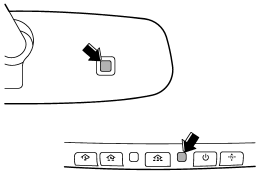
The mirror has a photosensor attached on both the front and back sides. During nighttime driving, these sensors detect distracting glare from vehicle headlights behind you and automatically dim the mirror to eliminate glare and preserve your vision. For this reason, use care not to cover the sensors with stickers, or other similar items. Periodically wipe the sensors clean using a piece of dry soft cotton cloth or an applicator.
NOTE
When cleaning the mirror, use a paper towel or similar item dampened with glass cleaner. Do not spray glass cleaner directly on the mirror surface. By doing so, the sprayed glass cleaner could enter the inside of the mirror housing. That may cause a malfunction in the mirror.
See also:
Cargo area cover (if equipped)
The cargo area cover is provided for covering the cargo area and to protect its
contents from direct sunlight. This cover is detachable to make room for additional
cargo. ...
Ignition switch
- Never turn the ignition switch to
“LOCK” while the vehicle is
being driven or towed because
that will lock the steering wheel,
preventing steering control. And
when the engine is turne ...
Front passenger’s SRS frontal airbag
The front passenger’s SRS frontal airbag uses a dual stage inflator. The inflator
operates in different ways depending on the severity of impact.
The total load on the seat is monitored by the pass ...