


Clock
NOTE
Your SUBARU dealer can change the settings of activating/deactivating the automatic adjustment of the clock by the GPS (Global Positioning System) (for models with the genuine SUBARU navigation system). Contact your SUBARU dealer for details.
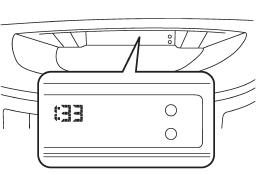
The clock shows the time while the ignition switch is in the “Acc” or “ON” position.
To adjust the time shown by the clock, press the “+” button or the “−” button. If you press the “+” button, the indicated time will change in one-minute increments. If you press the “−” button, the indicated time will change in one-minute decrements. If you keep the button pressed, the rate at which the indicated time changes will speed up.
See also:
Rear window wiper and washer switch – 5-door
: Washer (accompanied by wiper
operation)
ON: Continuous
INT: Intermittent
OFF: Off
: Washer ...
Recommended grade and viscosity
Each oil manufacturer has its own base
oils and additives. Never use different
brands together. For details, refer to
“Manual transmission, front differential
and rear differential gear oil”. ...
Installing child restraint systems with A/ELR
seatbelt
- Child restraint systems and seatbelts
can become hot in a vehicle
that has been closed up in sunny
weather; they could burn a small
child. Check the child restraint
system before you p ...