


Forward and backward adjustment
Subaru Legacy / Subaru Legacy Owners Manual / Seat, seatbelt and SRS airbags / Front seats / Manual seat / Forward and backward adjustment
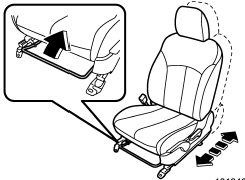
Pull the lever upward and slide the seat to the desired position. Then release the lever and try to move the seat back and forth to make sure that it is securely locked into place.
See also:
Station preset
Preset buttons ...
How to jump start
1. Make sure the booster battery is 12 volts and the negative terminal is grounded.
2. If the booster battery is in another vehicle, do not let the two vehicles
touch.
3. Turn off all unnecessary ...
Audio settings (type D audio)
1. Press the “TUNE/TRACK/CH” dial to
display “SETTING Menu”.
2. Operate the “TUNE/TRACK/CH” dial
to select the preferred menu. You can
select the menu as shown in the following
chart.
3. O ...