


5-door models
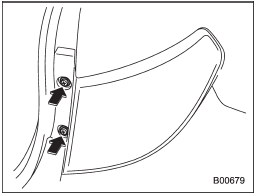
1. Using a Phillips screwdriver, remove the upper and lower screws that secure the rear combination light assembly.
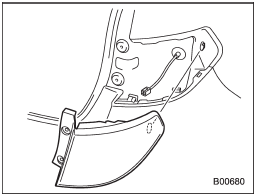
2. Slide the rear combination light assembly rearward and remove it from the vehicle.
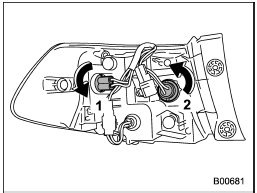
1) Rear side marker light
2) Rear turn signal light
3. Remove the bulb socket from the rear combination light assembly by turning it counterclockwise.
4. Pull the bulb out of the bulb socket and replace it with a new one.
5. Set the bulb socket into the rear combination light assembly and turn it clockwise until it locks.
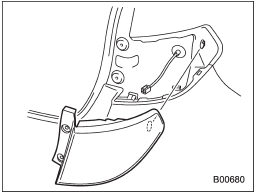
6. Put the rear combination light assembly into place while aligning the clip with the guide on the vehicle.
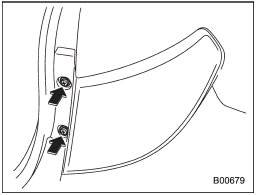
7. Tighten the upper and lower screws.
See also:
Tone and balance control
Each brief press of the “TUNE/TRACK/ CH” dial changes the control modes in the
following sequence.
Choose the desired level for each mode by turning the “TUNE/TRACK/CH” dial. The
control func ...
Rocking the vehicle
If you must rock the vehicle to free it from snow, sand, or mud, depress the
accelerator pedal slightly and move the shift lever/select lever back and forth
between “1”/“D” and “R” repeatedly. Do ...
Recommended grade and viscosity
Each oil manufacturer has its own base oils and additives. Never use different
brands together. For details, refer to “Manual transmission, front differential
and rear differential gear oil” F12-6 ...