


Low beam light bulbs
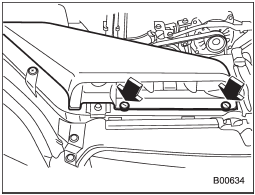
Right-hand side
1. Use a screwdriver to undo the clips on the air intake duct, then remove the air intake duct (right-hand side).
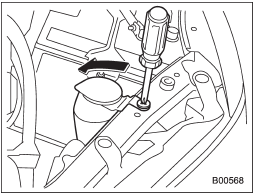
Left-hand side
2. Use a screwdriver to remove the secured clip of the washer tank. To make it easy to access the bulb, move the washer tank to the horizontal direction (left-hand side).
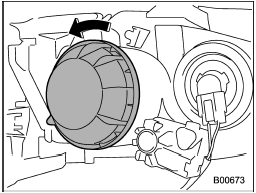
3. Remove the bulb cover, by turning it counterclockwise.
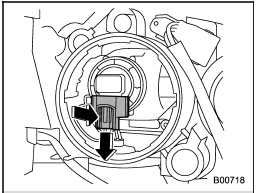
4. Disconnect the electrical connector from the bulb.
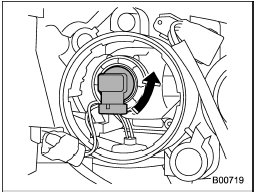
5. Remove the bulb from the headlight assembly by turning it counterclockwise.
6. Replace the bulb with a new one. At this time, do not touch the bulb surface.
7. To install the bulb to the headlight assembly, turn it clockwise until it clicks.
8. Reconnect the electrical connector.
9. Install the bulb cover.
10. Install the air intake duct with clips (right-hand side).
11. Set the washer tank to the original place and secure it by clip (left-hand side).
See also:
Turbo models except STI
1) Power steering fluid reservoir
2) Manual transmission oil level gauge (MT)
3) Clutch fluid reservoir
4) Brake fluid reservoir
5) Fuse box
6) Battery
7) Windshield washer tank
8) Engine oil ...
Tire care – maintenance and safety practices
● Check on a daily basis that the tires are free from serious damage, nails,
and stones. At the same time, check the tires for abnormal wear.
● Inspect the tire tread regularly and repl ...
Center ventilators
Center ventilators
Move the tab to adjust the flow direction. ...