


Type B
1. Raise the wiper arm off the windshield.
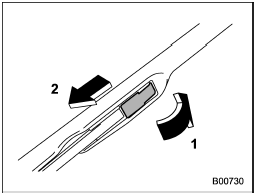
1) Open the cover
2) Pull down the wiper blade
2. Remove the wiper blade assembly by opening the cover and pulling it down in the direction shown in the illustration.
3. Install the wiper blade assembly to the wiper arm. Make sure that it locks in place.
4. Hold the wiper arm by hand and slowly lower it in position.
See also:
Entering the vehicle following remote engine start
shutdown
An alarm trigger may occur if the vehicle is
opened by the remote keyless entry
transmitter within a few seconds immediately
following remote engine start shutdown. ...
Tire pressure monitoring system (TPMS) (U.S.-spec. models)
Turbo models
Non-turbo models
The tire pressure monitoring system provides the driver with the warning message indicated by sending a signal from a sensor that is installed in each wheel when tire p ...
Airflow control dial
Airflow control dial
Each dial position activates the following
air outlets.
AUTO: The airflow control is adjusted
automatically in accordance with the air
temperature inside and outside the ...