


Volume control
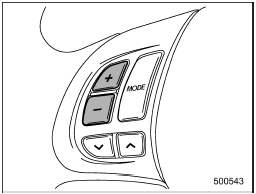
Volume control
You can adjust the phone call volume, the voice volume and the voice guidance volume. Refer to “Volume control buttons”.
See also:
How to insert a CD (type A, C and D)
Hold a disc with a finger in the center hole
while gripping the edge of the disc, then
insert it in to the slot (with the label side
up) and the player will automatically pull
the disc into po ...
To set cruise control
1. Press the “CRUISE” main switch button.
The cruise control indicator light on the combination meter will illuminate.
2. Depress the accelerator pedal until the vehicle reaches the desired spee ...
System servicing
- When discarding a seatbelt retractor
assembly or scrapping
the entire vehicle damaged by a
collision, consult your SUBARU
dealer.
- Tampering with or disconnecting
the system’s wiring ...