


Random playback
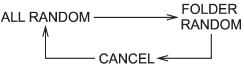
Random playback is operated in the same way a CD is played. Refer to “Random playback”. Each time you press the “RPT/RDM” button for 0.5 second or longer, the mode changes in the following sequence.
See also:
Tool bag
1) Screwdriver
2) Wheel nut wrench
3) Hex-head wrench (only models with moonroof)
4) Tool bag
The screwdriver and wheel nut wrench are stored in the tool bag. ...
2011 Subaru Tribeca review
Subaru is on a roll, with recent redesigns of the Forester, Outback and
Legacy earning recognition from Cars.com editors and consumers alike for their
value and how competitive they are within the ...
Safety
Still think you can't have it all? Check out the Impreza's crash tests, which
at the time of publication are the best in the Insurance Institute for Highway
Safety's Small Car class, with top scor ...