


Display selection
Type A and B audio
Type C audio
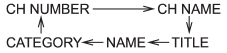
Press the “TEXT” button while receiving the satellite radio to change the display as follows.
See also:
Emergency Locking Retractor (ELR)
The driver’s seatbelt has an Emergency Locking Retractor (ELR).
The emergency locking retractor allows normal body movement but the retractor
locks automatically during a sudden stop, impact or if ...
Windshield wipers
MIST : Mist (for a single wipe)
OFF : Off
INT: Intermittent
LO: Low speed
HI: High speed
To turn the wipers on, push the wiper control lever down.
To turn the wipers off, return the lever to t ...
Checking the fluid level
Check the fluid level on the outside of the reservoir. If the level is below “MIN” level mark, add the recommended clutch fluid to “MAX” level mark.
Use only clutch fluid from a sealed container.
...