


Control panel
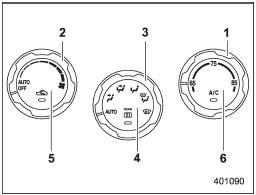
Control panel
1) Temperature control dial
2) Fan speed control dial
3) Airflow control dial
4) Control switch of the defogger and deicer system (Refer to “Defogger and
deicer”.)
5) Air inlet selection button
6) Air conditioner button
See also:
How to play back
1. Connect a USB storage device / iPod®.
2. Press the “CD/AUX” button. Each time you briefly press the button, the mode changes in the following sequence.
*: Only when a Media Hub is connected.
...
Tone and balance control (type A, B and C audio)
Each brief press of the “TUNE/TRACK/
CH” dial changes the control modes in the
following sequence.
Choose the preferred level for each mode
by turning the “TUNE/TRACK/CH” dial.
The control ...
Type A seat heater
Type A seat heater
1) HI – Rapid heating
2) LO – Normal heating
3) OFF – Off
A) Left-hand side
B) Right-hand side
To turn on the seat heater, push the “LO” or “HI” position on the switch, as des ...