


Heating
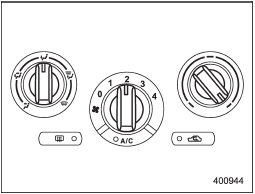
Heating
To direct warm air toward the floor:
1. Set the air inlet selection button to the OFF position.
2. Set the airflow control dial to the “ ” position.
3. Set the temperature control dial to the most comfortable level.
4. Set the fan speed control dial to the desired speed.
See also:
MMT
Some gasoline contains an octane-enhancing additive called MMT (Methylcyclopentadienyl Manganese Tricarbonyl). If you use such fuels, your emission control system performance may deteriorate and the C ...
Examples of the types of accidents in which it is possible that the SRS side
airbag and the SRS curtain airbag will deploy.
1) Hitting a curb, edge of pavement or hard
surface
2) Falling into or jumping over a deep hole
3) Landing hard or vehicle falling
It is possible that the SRS side and curtain
airbags will ...
To turn off the cruise control
There are two ways to turn off the cruise control:
• Push the “CRUISE” main switch button again.
• Turn the ignition switch to the “Acc” or “LOCK” position (but only when the vehicle is completely s ...