


Control panel
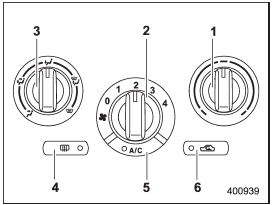
Control panel
1) Temperature control dial
2) Fan speed control dial
3) Airflow control dial
4) Control switch of the defogger and deicer system (Refer to “Defogger and
deicer”.)
5) Air conditioner button
6) Air inlet selection button
See also:
Operation
If the driver and/or front passenger have/ has not yet fastened the seatbelt(s)
when the ignition switch is turned to the “ON” position, the seatbelt warning light(s)
will flash for 6 seconds, to ...
Media format
Bluetooth® audio devices cannot be connected if they are not compatible with the following Bluetooth® profiles.
• A2DP (Advanced Audio Distribution Profile)
• AVRCP (Audio/Video Remote Control Profi ...
U.S.-spec. models
1) Trip meter A/B selection and trip meter reset knob (page 3-6)
2) Tachometer (page 3-7)
3) Trip meter and odometer (page 3-6)
4) Speedometer (page 3-6)
5) Multi function display switching knob ...