


Side ventilators
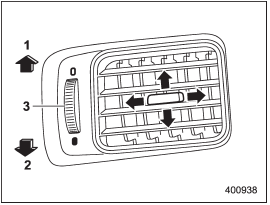
Side ventilators
1) Open
2) Close
3) Thumb-wheel
Move the tab to adjust the flow direction.
To open or close the ventilator, turn the thumb-wheel up or down.
See also:
Operation
The SRS side airbag and SRS curtain airbag can function only when the ignition switch is in the “ON” position.
The driver’s and front passenger’s SRS side airbags and SRS curtain airbags deploy ind ...
Tire rotation direction mark
Example of tire rotation direction mark
1) Front
If the tire has the rotation direction
specification, the tire rotation direction
mark is placed on its sidewall.
When you install a tire that ...
Inside mirror
Inside mirror
The inside mirror has a day and night position. Pull the tab at the bottom of the mirror toward you for the night position.
Push it away for the day position. The night position reduce ...