


Locking the passengers’ windows
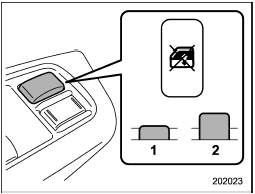
Locking the passengers’ windows
1) Lock
2) Unlock
Push the lock switch. When the lock switch is in the “LOCK” position, the passengers’ windows cannot be opened or closed.
Push the switch again to cancel the passengers’ window locking.
See also:
Front passenger cup holder
Do not pick up a cup from the cup
holder or put a cup in the holder
while you are driving, as this may
distract you and lead to an accident.
A dual cup holder is built in the center
c ...
Rear gate – if the rear gate cannot be unlocked
In the event that you cannot unlock the rear gate by operating the power door locking switches or the remote keyless entry system, you can unlock it from inside the cargo area.
1. Remove the access ...
Changing the coolant
Never attempt to remove the radiator cap until the engine has been shut off and has cooled down completely. Since the coolant is under pressure, you may suffer serious burns from a spray of boilin ...