


Operating the driver’s window (type B)
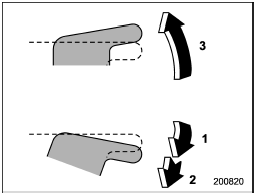
Operating the driver’s window (type B)
1) Open
2) Automatically open
3) Close
To open:
Push the switch down lightly and hold it.
The window will open as long as the switch is held.
This switch also has a one-touch auto down feature that allows the window to be opened fully without holding the switch.
Push the switch down until it clicks and release it, and the window will fully open.
To stop the window halfway, pull the switch up lightly.
To close:
Pull the switch up lightly and hold it. The window will close as long as the switch is held.
See also:
CHECK ENGINE warning light/Malfunction indicator lamp
If the CHECK ENGINE light illuminates while you are driving, have your vehicle checked/repaired by your SUBARU dealer as soon as possible. Continued vehicle operation without having the emission ...
Door open warning light
The door open warning light illuminates if
any door or the rear gate is not fully
closed.
Always make sure this light is out before
you start to drive. ...
Defrosting or defogging the windshield
Defrosting or defogging the windshield
To direct warm air to the windshield and
front door windows:
1. Set the airflow control dial to the “”
position.
2. Turn the temperature control dial ...