


Dimensions
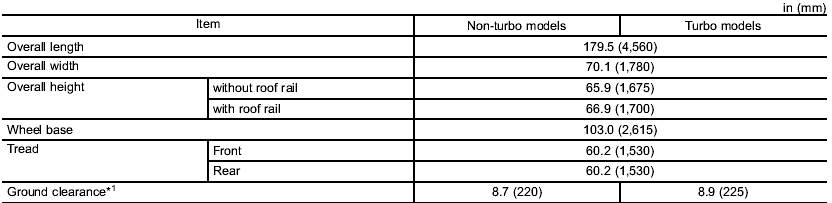
*1: Measured with vehicle empty
See also:
Driving tips
Do not drive with your foot resting on the clutch pedal and do not use the clutch
to hold your vehicle at a standstill on an upgrade. Either of those actions may
cause clutch damage.
Do not drive ...
Fuel octane rating
This octane rating is the average of the Research Octane and Motor Octane numbers and is commonly referred to as the Anti Knock Index (AKI).
Using a gasoline with a lower octane rating can cause pers ...
Foreword
Congratulations on choosing a SUBARU vehicle. This Owner’s
Manual has all the information necessary to keep your SUBARU in
excellent condition and to properly maintain the emission control
syste ...