


License plate light
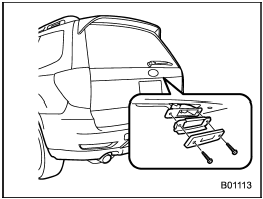
1. Remove the mounting screws using a Phillips screwdriver.
2. Remove the cover and lens.
3. Pull the bulb out of the socket.
4. Install a new bulb.
5. Reinstall the lens and cover.
6. Tighten the mounting screws.
See also:
Deleting the callback data
1. Select the “CALLBACK” menu.
2. Select the phone number by operating the “TUNE/TRACK/CH” dial.
3. Select the “DELETE” menu.
4. Select the “CONFIRM” menu. Then “DELETED” is displayed and the selec ...
Drinking and driving
Drinking and then driving is very dangerous. Alcohol in the bloodstream delays your reaction time and impairs your perception, judgment and attentiveness. If you drive after drinking – even if you d ...
Jump starting
- Battery fluid is SULFURIC ACID.
Do not let it come in contact with
the eyes, skin, clothing or the
vehicle.
If battery fluid gets on you,
thoroughly flush the exposed
area with water i ...