


Position light
Subaru Forester / Subaru Forester Owners Manual / Maintenance and service / Replacing bulbs / Position light
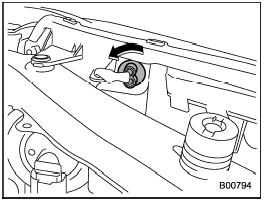
1. Turn the bulb socket counterclockwise and pull out the socket.
2. Pull the bulb out of the socket.
3. Install a new bulb.
4. Install the bulb socket by turning it clockwise.
See also:
Acc
In this position the electrical accessories
(radio, accessory power outlet, etc.) can
be used. ...
Drinking and driving
WARNING
Drinking and then driving is very dangerous. Alcohol in the bloodstream delays
your reaction and impairs your perception, judgment and attentiveness. If you drive
after drinking – even if ...
STI
1) Power steering fluid reservoir
2) Clutch fluid reservoir
3) Brake fluid reservoir
4) Fuse box
5) Battery
6) Windshield washer tank
7) Engine oil filler cap
8) Engine coolant reservoir
9) ...