


Non-turbo models
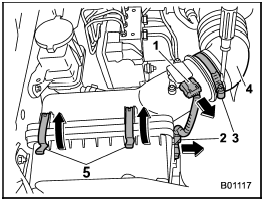
Non-turbo models
1) Connector
2) Clip
3) Clamp
4) Air intake boot
5) Clip
1. Unplug the connector that is attached to the top of the air cleaner case.
2. Detach the connector cable from the clip on the right side on the air cleaner case.
3. Loosen the screw of the clamp and pull the air intake boot out of the air cleaner case.
4. Unsnap the two clips holding the air cleaner case cover.
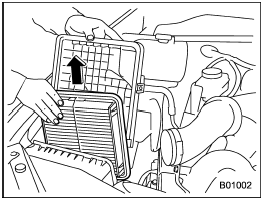
5. Open the air cleaner case and remove the air cleaner element.
6. Clean the inside of the air cleaner case and case cover with a damp cloth and install a new air cleaner element.
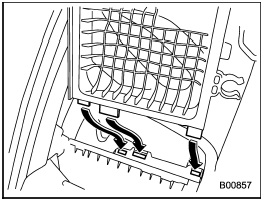
7. To install the air cleaner case, insert the three projections on the air cleaner case into the slits on the air cleaner case cover.
8. Install in the reverse order of removal.
See also:
Remote control mirror switch
Remote control mirror switch
1) Selection switch
2) Direction control switch
The remote control mirrors operate only
when the ignition switch is in the “ON” or
“Acc” position.
1. Press ei ...
Shift lock release using the shift lock release button
Perform the following procedure to release the shift lock.
1. Apply the parking brake and stop the engine.
2. Remove the shift lock cover using a flat-head screwdriver. The shift lock release butt ...
Trailer hitch (dealer option)
- Never exceed the maximum
weight specified for the trailer
hitch. Exceeding the maximum
weight could cause an accident
resulting in serious personal injuries.
Permissible trailer weight ...