


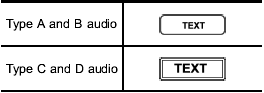
Displaying radio PS (Program Service Name) and RT (Radio Text)
Subaru Forester / Subaru Forester Owners Manual / Audio / FM/AM radio operation / Displaying radio PS (Program Service Name) and RT (Radio Text)
See also:
Choosing a child restraint system
Choose a child restraint system that is
appropriate for the child’s age and size
(weight and height) in order to provide the
child with proper protection. The child
restraint system should m ...
Before driving your vehicle
Before entering the vehicle, remove any snow or ice from your shoes because that
could make the pedals slippery and driving dangerous.
While warming up the vehicle before driving, check that the ac ...
Compass zone adjustment
Compass calibration zones
1. Refer to the “Compass calibration zones” map shown above to verify that the
compass zone setting is correct for your geographical location.
2. Press and hold the com ...