


Cooling or dehumidifying
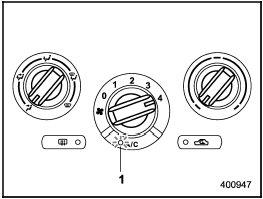
Cooling or dehumidifying
1) ON position
For cooling and dehumidification of the
passenger compartment, performing the
following steps will allow air to flow
through the instrument panel outlets:
1. Set the air inlet selection button to the
OFF position.
2. Set the airflow control dial to the “ ”
position.
”
position.
3. Set the air conditioner button to the “ON” position.
4. Set the temperature control dial to the blue side.
5. Set the fan speed control dial at the highest speed.
See also:
Impreza in the Market
The improved Impreza stands to steal buyers away from brands that have taken
their eyes off the ball. Its interior quality has jumped, right when some class
leaders have foolishly allowed their in ...
Temporary spare tire
WARNING
● Never tow a trailer when the temporary spare tire is used. The temporary spare
tire is not designed to sustain the towing load. Use of the temporary spare tire
when towing can res ...
New vehicle break-in driving – the first 1,000 miles (1,600 km)
The performance and long life of your vehicle are dependent on how you handle and care for your vehicle while it is new.
Follow these instructions during the first 1,000 miles (1,600 km):
• Do not r ...