


Warning and indicator lights
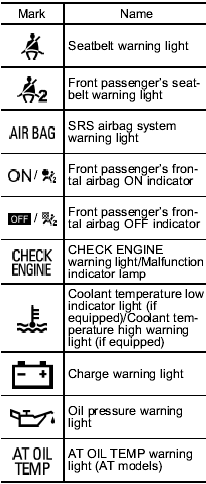
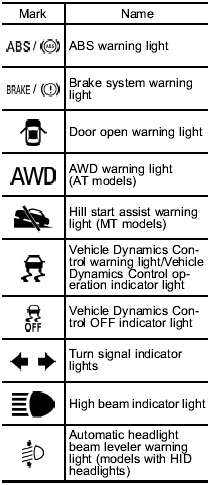
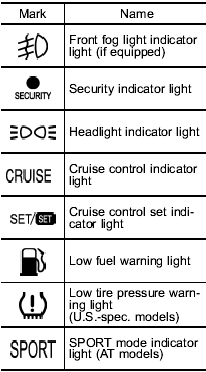
See also:
Back-up light (5-door)
1. Apply a flat-head screwdriver to the light cover as shown in the illustration, and pry the light cover off from the rear gate trim.
2. Turn the bulb socket counterclockwise and remove it.
3 ...
Tripped sensor identification
The security indicator light flashes when the alarm system has been triggered.
Also, the number of flashes indicates the location of unauthorized intrusion or
the severity of impact on the vehicle ...
Synthetic oil
You should use synthetic engine oil that meets the same requirements given for conventional engine oil. When using synthetic oil, you must use oil of the same classification, viscosity and grade shown ...