


Trunk light (Legacy)
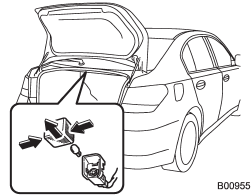
1. Push both sides of the light cover, and then remove the cover by pulling it out.
2. Pull the bulb out of the socket.
3. Install a new bulb.
4. Reinstall the cover.
See also:
Unleaded gasoline
The neck of the fuel filler pipe is designed to accept only an unleaded gasoline
filler nozzle. Under no circumstances should leaded gasoline be used because it
will damage the emission control sy ...
Headlights (models without HID headlights)
Halogen headlight bulbs become very hot while in use. If you touch the bulb surface with bare hands or greasy gloves, fingerprints or grease on the bulb surface will develop into hot spots, causin ...
Shock sensors (dealer option)
The shock sensors trigger the alarm
system when they sense impacts applied
to the vehicle and when any of their
electric wires are cut. The alarm system
causes the horn to sound and the turn
...