


Door step light
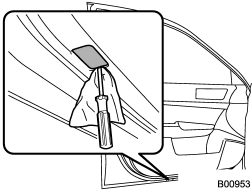
1. Remove the lens by prying the edge of the lens with a flat-head screwdriver.
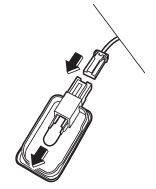
2. Pull the bulb out of the socket.
3. Install a new bulb.
4. Reinstall the lens.
See also:
Brake system warning light
- Driving with the brake system
warning light on is dangerous.
This indicates your brake system
may not be working properly. If
the light remains illuminated,
have the brakes inspecte ...
Child safety
- Never hold a child on your lap or
in your arms while the vehicle is
moving. The passenger cannot
protect the child from injury in a
collision, because the child will
be caught between ...
HomeLink® Wireless Control System
The HomeLink® Wireless Control System can be used to activate remote control devices such as gate operators, garage door openers, door locks, home lighting and security systems.
There are three HomeL ...