


Map light
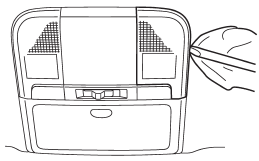
1. Remove the lens by prying the edge of the lens with a flat-head screwdriver.
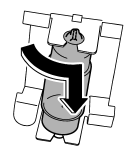
2. Turn the bulb until the flat surfaces at its ends are aligned vertically. Pull the bulb straight downward to remove it.
3. Install a new bulb.
4. Reinstall the lens.
See also:
Brake assist system
Do not be overconfident about the
brake assist. It is not a system that
brings more braking ability to the
vehicle beyond its braking capability.
Always use the utmost care
when driving r ...
Average fuel consumption
1) U.S.-spec. models
2) Except U.S.-spec. models
This indication shows the average rate of fuel consumption since the trip meter
was last reset.
Pressing the trip knob toggles the indication be ...
Ignition switch
• Never turn the ignition switch to “LOCK” while the vehicle is being driven or towed because that will lock the steering wheel, preventing steering control. And when the engine is turned off, it ...