


Checking the oil level
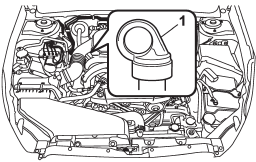
Non-turbo models
1) Yellow handle
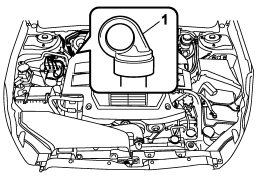
Turbo models
1) Yellow handle
Check the oil level monthly.
1. Park the vehicle on a level surface and stop the engine.
2. Pull out the level gauge, wipe it clean, and insert it again.
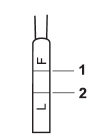
1) Upper level
2) Lower level
3. Pull out the level gauge again and check the oil level on it. If it is below the lower level, add oil through the level gauge hole to bring the level up to the upper level.
CAUTION
Be careful not to spill manual transmission oil when adding it. If oil touches the exhaust pipe, it may cause a bad smell, smoke, and/or a fire. If oil gets on the exhaust pipe, be sure to wipe it off.
See also:
Examples of the types of accidents in which it is possible that the SRS side
airbag and the SRS curtain airbag will deploy (Outback).
1) Hitting a curb, edge of pavement or hard surface
2) Falling into or jumping over a deep hole
3) Landing hard or vehicle falling
It is possible that the SRS side and curtain airbags will deploy ...
Bluetooth® audio operation
NOTE
Depending on the connected device, it
may not activate as per the following
items or not work smoothly. ...
2.5 L turbo models
1) Power steering fluid reservoir (page 11-27)
2) Manual transmission oil level gauge (page 11-23)
3) Clutch fluid reservoir (page 11-29)
4) Brake fluid reservoir (page 11-28)
5) Fuse box (page ...