


Precautions to observe when handling a compact disc
Use only compact discs (CDs, CD-Rs and CD-RWs) that have the mark shown in the following illustration. Also, some compact discs cannot be played.


● You cannot use a DualDisc in the CD player. If you insert a DualDisc into the player, the disc may not come out again, possibly causing the player to malfunction.
● In cold and/or rainy weather, dew can form inside the CD player, preventing normal operation. If this happens, eject the CD and wait for the player to dry out.
● Skipping may occur when the CD player is subjected to severe vibration (for example, when the vehicle is driven on a rough surface).
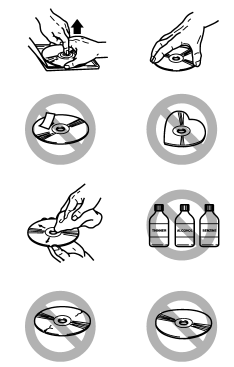
● To remove a disc from the case, press the center of the case and hold both edges of the disc. If the disc surface is touched directly, contamination could cause poor tone quality. Do not touch the disc surface.
● Use a clean disc whenever possible. If there are deposits, wipe the disc surface from the center outward with a dry, soft cloth. Be sure not to use a rough cloth, thinner, benzine, alcohol, etc.
● Do not use any disc that is scratched, deformed, or cracked. Also, do not use any disc that has a non-standard shape (for example, a heart shape). Malfunctions or problems might result.
● A disc is vulnerable to heat. Never keep it either in places exposed to direct sunlight, near heaters or in vehicles parked in the sun or on hot days.
● Insert discs one by one into the CD player.
See also:
Shift lock release using the shift lock release button
Perform the following procedure to release
the shift lock.
1. Apply the parking brake and stop the
engine.
2. Remove the shift lock cover using a
flat-head screwdriver. The shift lock rele ...
Cruise control set indicator light
The cruise control set indicator light illuminates when the ignition switch is
turned to the “ON” position and turns off after approximately 3 seconds.
The light illuminates when vehicle speed ha ...
Armrest (if equipped)
Armrest (if equipped)
To lower the armrest, pull on the top edge of the armrest.
To avoid the possibility of serious injury, passengers must never be allowed to sit on the center armrest while t ...