


When CD is in the player (type A)/ When playing back all CDs in the player (type B)
Subaru Legacy / Subaru Legacy Owners Manual / Audio / CD player operation / How to play back a CD / When CD is in the player (type A)/ When playing back all CDs in the player (type
B)
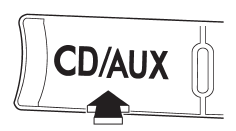
When the “CD/AUX” button is pressed, the player will start playback.
See also:
Warning and indicator lights
...
Coin tray (if equipped)
Coin tray (if equipped)
A coin tray is built in the center console. ...
Behavior with key lock-in prevention function operational
With the driver’s door open, the doors are automatically kept unlocked even if
the front side of the power door locking switch is pressed. ...