


Tone and balance control
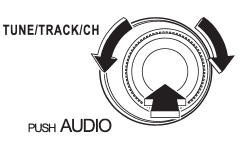
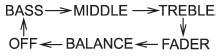
Each brief press of the “TUNE/TRACK/ CH” dial changes the control modes in the following sequence.
Choose the desired level for each mode by turning the “TUNE/TRACK/CH” dial. The control function returns to the tune/ track/channel control mode after approximately 5 seconds.
See also:
Making a phone call
Making a phone call from the phone book
It is possible to select a phone number from the phonebook registered with the
invehicle equipment to make a phone call.
1. Press the OFF hook switch . Pres ...
The Inside
The Forester's dash sits higher against the windshield than you'll find in
many SUVs, which gives the cabin a more carlike feel and a lower perceived
driving position. Thanks to the large side and ...
Checking the fluid level when the fluid is cold
When the fluid level has to be checked without time to warm up the automatic
transmission, check to see that the fluid level is between the lower level and upper
level on the “COLD” range. If it i ...