


Wiper intermittent time control
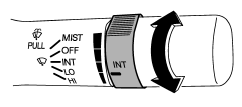
When the wiper switch is in the “INT” position, turn the dial to adjust the operating interval of the wiper. The operating interval can be adjusted in five steps from the shortest interval to the longest.
See also:
Turbo models
Except STI
The engine is designed to operate using premium unleaded gasoline with an octane rating of 91 AKI (95 RON) or higher. If premium unleaded gasoline is not available, regular unleaded gasoli ...
Front turn signal light
NOTE
It may be difficult to replace the bulbs. We recommend that you have the bulbs
replaced by your SUBARU dealer if necessary.
1. Turn over the protective cover of the engine compartment.
2 ...
Checking the brake pedal free play
1) 0.02 – 0.08 in (0.5 – 2.0 mm)
Stop the engine and firmly depress the
brake pedal several times. Lightly pull the
brake pedal up with one finger to check
the free play with a force of less ...