


Operating the passengers’ windows
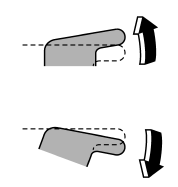
To open:
Press the appropriate switch down and hold it until the window reaches the desired position.
To close:
Pull the switch up and hold it until the window reaches the desired position.
See also:
SUBARU advanced frontal airbag system
Your vehicle is equipped with a SUBARU advanced frontal airbag system that complies
with the new advanced frontal airbag requirements in the amended Federal Motor Vehicle
Safety Standard (FMVSS) N ...
Vehicle symbols
There are some of the symbols you may see on your vehicle.
For warning and indicator lights, refer to “Warning and indicator lights” F19.
...
Front seatbelt pretensioners
The driver’s and front passenger’s seatbelts have a seatbelt pretensioner. The
seatbelt pretensioners are designed to be activated in the event of an accident
involving a moderate to severe fron ...